Frequently Asked Questions
Registration and Account
How can I register an account?
- Open the registration form.
- Enter your Email or mobile phone number.
Make sure the details you provide are valid — they will be used for login and account confirmation. - Create and enter a password.
It is recommended to use a strong password with numbers and letters. - (Optional) Enter a promo code.
If you have a bonus promo code — enter it in the corresponding field. If not — leave the field empty. - Select the account currency.
Click on one of the available options:
EUR, RUB, USD, KZT, TRY, AZN, AMD. - Check the box to agree with the rules.
Tick the checkbox next to the phrase:
“I agree with the terms and conditions and I am over 18 years old” — this is mandatory. - (Optional) Subscribe to promotional notifications.
The second checkbox allows you to receive promotions via email, SMS, and Viber. - Click the "REGISTRATION" button.
What should I do if I didn’t receive the registration confirmation email?
- Check the "Spam" / "Junk" folder.
Account activation emails may sometimes end up in the “Spam” folder — be sure to check it. - Check other email folders.
Sometimes the email may appear in sections such as:- "Promotions"
- "Updates"
- "All Mail"
- "Social"
- Add our address to "Safe Senders" (Whitelist).
Click “Not spam” or add the sender’s address to your trusted contacts — this will help you receive emails without issues in the future. - Make sure the email address was entered correctly.
Check for possible typos during registration (for example, .con instead of .com, etc.). - If nothing helped — please contact support.
Write to the online chat on the website or send an email to the support team specifying your email address, so our specialists can manually activate your account.
I forgot my password and can’t log into my account. What should I do?

- Open the login form.
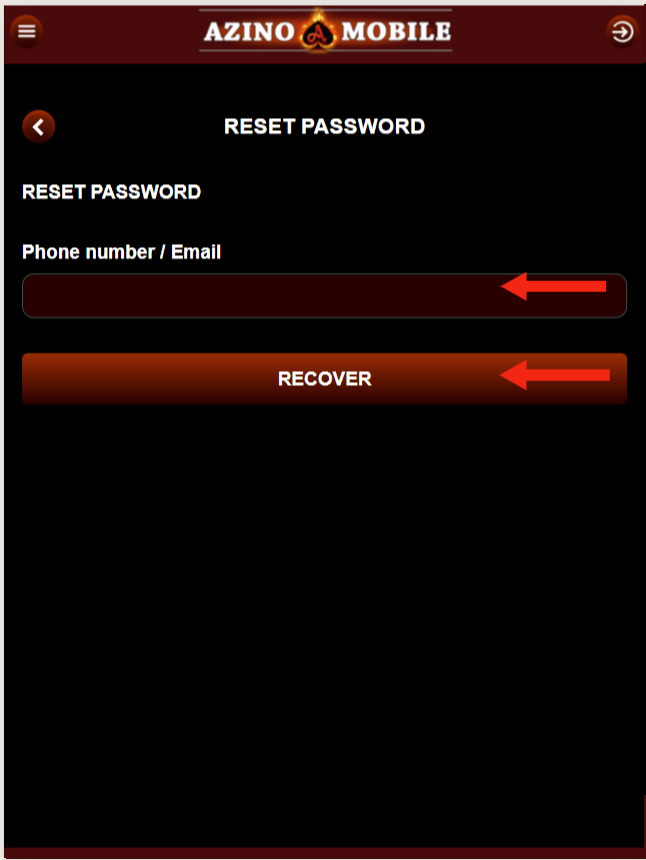
On the login screen, click “Reminder” (the link below the login and password fields).
(see image 1) - Select a recovery method.
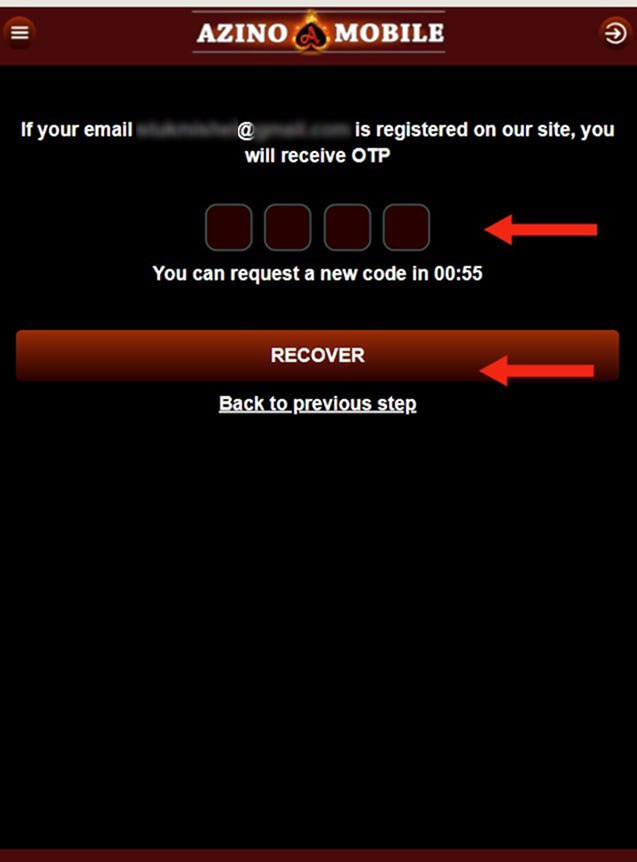
Enter the phone number or email address linked to your account. - If you enter a phone number — click “Recover”, and an SMS with a code will be sent to your number.
(see image 2) - If you enter an email — a message with a password reset link will be sent.
Check your “Inbox” as well as the “Spam” folder. - Confirm the code or follow the link from the email.
- When entering the code: fill in the fields and click “Recover”.
- When recovering via email: open the message and follow the password reset link.
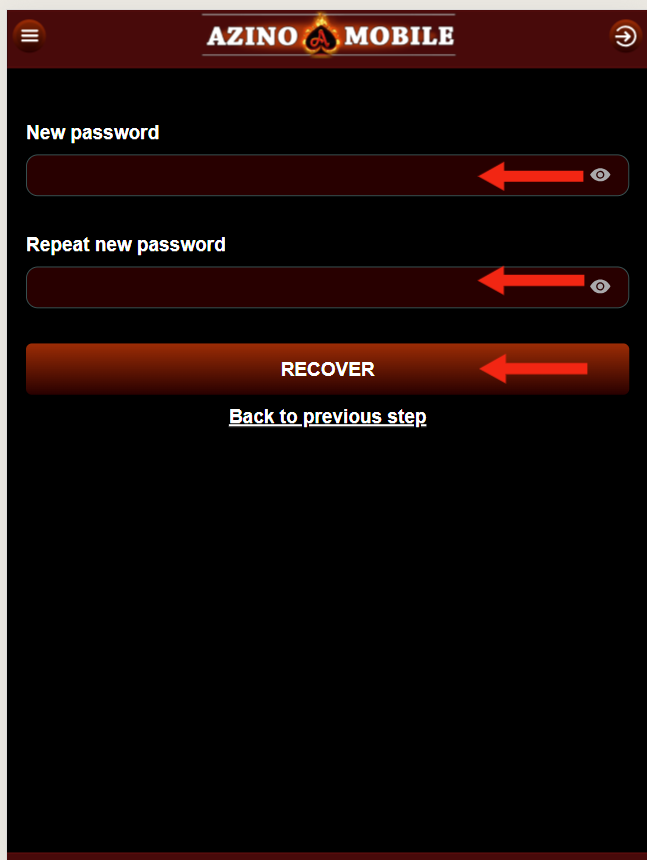
(see image 3) - Set a new password.
Create and enter a new password, then confirm it and click “Recover”.
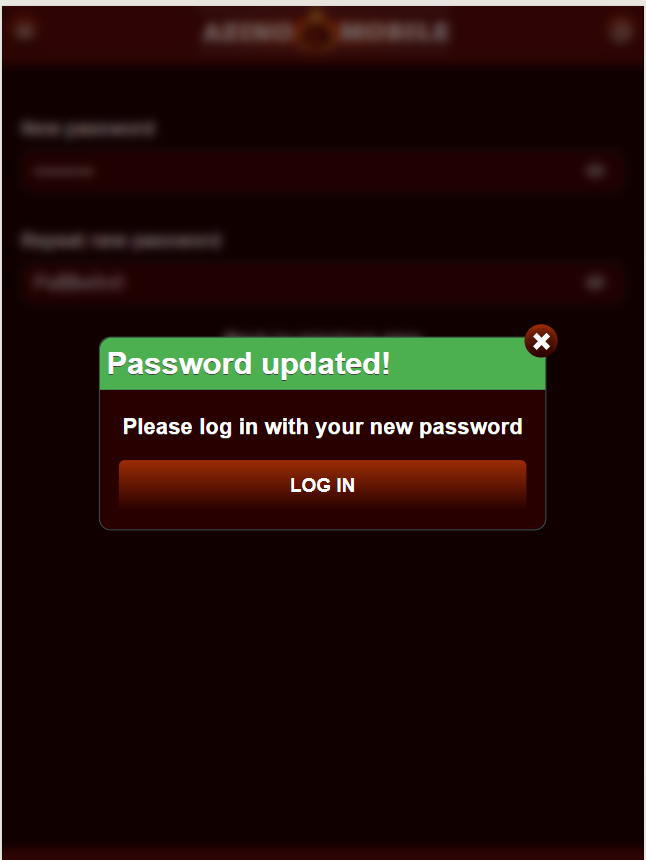
(see image 4) - Confirmation.
You will see the message: “Success! Password has been successfully changed.” Click “Login” and sign in with your new password.
(see image 5)
Deposits and Withdrawals
How can I make a deposit?
To make a deposit, you must be logged in on the website. To complete the operation, follow these steps:
Funds will be credited to your gaming balance within 15 minutes.
- Go to the “Cashier” - “Deposit” section
- Select a convenient deposit method
- Enter the desired amount and click “Pay”
- Once payment details appear, go to your bank/wallet app and complete the payment strictly using the provided details.
- Return to the payment details page and click “I have paid”.
How can I check if the funds were credited?
You can find balance information in the side menu on the website,

How can I withdraw funds from my balance?
To withdraw funds, go to the “Cashier” - “Withdraw” section. Then select the payment method used for your last deposit and enter the same payment details. After filling in the fields, click “Withdraw” and a withdrawal request will be created. You can track its status in the “Payouts” section. You can read more about our withdrawal policy in the “Terms and Conditions” section.
I have been waiting a long time for my payout.
If your withdrawal request has the status “Pending”, it means the request is under review and will be processed within 24 working hours from Monday to Friday. Unfortunately, delays beyond our control may sometimes occur. In this case, the status will change to “Processing”. This means the casino has sent the payout, but the bank or payment system is still processing it. This process may take up to 7 business days, but usually takes less time. We recommend waiting patiently for the funds to be credited.
Games
Games are experiencing lag or interruptions.
Game performance depends entirely on your internet connection. Since our games require constant data exchange, sufficient internet bandwidth is required. We recommend limiting other web applications running simultaneously on your computer to improve performance.
Why do some games not open?
Access issues may be caused by various factors. We recommend checking your internet speed, using the Google Chrome browser, and periodically clearing your browser cache and cookies. If the issue persists, try using incognito mode, another internet connection, or a VPN. Unfortunately, external factors beyond our control may also affect game availability. Access to some resources may be blocked by your internet provider or government authorities.
How can I be sure the winning percentage is fair?
Our platform offers games only from official providers. These providers are licensed and regulated in many countries. All game calculations are performed on the providers’ servers. We act only as an intermediary, delivering game results and winnings to players. Game outcomes are completely random and cannot be technically influenced.
Bonuses and Promotions
How can I receive a registration bonus?
To receive this bonus, you need to register on our website and confirm your phone number. The bonus is available only to unique users who have not previously registered.
Can I withdraw the registration bonus?
All funds won before making the first deposit are considered bonus funds. After the first deposit, bonus funds are transferred to the bonus balance. Funds on the bonus balance remain there until they are fully withdrawn via cashback. Cashback is credited from the bonus balance to the main balance and is available for withdrawal. This way, you can withdraw winnings earned before depositing using cashback.
How is the cashback amount calculated?
The calculation period runs from Thursday of the previous week to Wednesday of the current week. Cashback is credited on Thursday between 00:01 and 23:59 according to your local time. The bonus amount depends on deposits, withdrawals, and balance at the time of calculation. The cashback amount cannot exceed the maximum deposit made during the calculation week.
I did not receive my Birthday bonus.
Happy Birthday! We wish you all the best! The birthday bonus is credited automatically within 3 days of the date specified in your profile. The bonus amount ranges from 100 to 3000 RUB. Wagering requirement is x7. The bonus is credited once per year and only to one account. Please note that the bonus is available only to unique players.
Privacy and Security
How can I be sure you do not share my data with anyone?
We use the most reliable security systems available today. These include 128-bit SSL encryption, effective firewall data protection, and a five-level security system. This provides physical and digital protection of information, constant access control, systems preventing failures, and modern data encoding and encryption methods.
Can everyone play AzinoMobile casino for real money?
There are age and territorial restrictions:
Age restriction
To play for real money, you must be at least 18 years old.
Territorial restrictions
The gaming club does not provide services to users who are citizens of the following countries:
- Malta
- USA
- France
- Ukraine
- Moldova
Legal compliance
Online gambling is prohibited by law in some countries.
Users are solely responsible for checking and complying with the laws applicable in their country or state before registering on the platform.